ChangeCrab Badges: Make Changelog Activity Visible Without the Click
ChangeCrab badges display real update activity directly on your site, README, or docs - automatically and fairly.
Show Your Changelog Activity at a Glance with ChangeCrab Badges
Most users never open your changelog.
Even if your product ships regularly, the majority of visitors won’t click past your homepage, README, or documentation index. That means your latest updates stay hidden behind a link - while visitors quietly decide whether your project feels active or not.
ChangeCrab badges surface your changelog activity without requiring engagement, giving visitors instant reassurance that your project is alive and improving.
Create a free ChangeCrab account →
The Problem
A changelog only proves activity once someone opens it.
For everyone else, it’s invisible. Visitors scanning a page or repository have no signal that updates are happening unless they actively dig for them. In practice, this means:
- Active projects can look idle
- Potential users may assume maintenance is infrequent
- Teams lose an easy, passive trust signal
The issue isn’t unclear changelogs - it’s that most users never see them.
The Solution: Passive Activity Signals
ChangeCrab badges turn your changelog into a passive signal of maintenance.
They display real update activity directly where users already are - homepages, READMEs, and documentation - so visitors can instantly see that a project is actively maintained without clicking anything.
A Real Example
Here’s a live activity badge embedded directly into Markdown:
This works anywhere Markdown is supported, including README files and documentation.
What Makes ChangeCrab Badges Different
Automatic Updates
Embed once and forget about it. Badges update automatically as your changelog activity changes.
Fair Measurement
Activity is measured over time, not by raw post count. We track distinct weeks with updates, preventing short bursts from inflating results.
Multiple Badge Types
Choose the badge that fits your context:
- Update Frequency - “Updated Weekly”, “Updated Fortnightly”, or “Updated Quarterly”
- Tier Level - Gold, Silver, or Bronze activity tiers
- Activity Status - A simple “Active” or “Inactive” indicator
Activity Tiers at a Glance
Badges reflect real maintenance consistency, not vanity metrics.
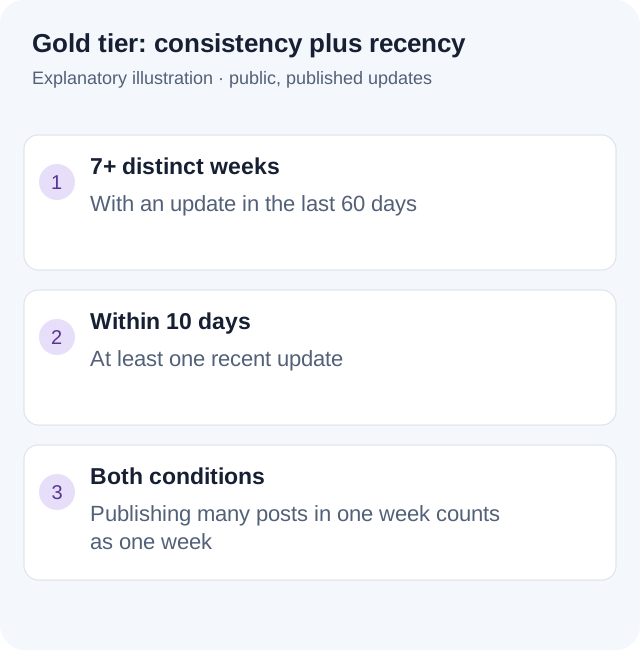
ChangeCrab evaluates changelog activity using clear, consistent rules:
- Gold Tier - 7+ distinct weeks with updates in the last 60 days and an update within the last 10 days
- Silver Tier - 4+ distinct weeks with updates in the last 60 days and an update within the last 21 days
- Bronze Tier - At least one update day in the last 60 days
- Inactive - No updates in the last 60 days
This ensures badges reflect genuine, ongoing maintenance - not occasional bursts of activity.
Easy Integration
Getting started takes seconds. Add a single line of code:
<script src="https://changecrab.com/badge.js?id=YOUR_CHANGELOG_ID&type=frequency&style=flat"></script>
Your badge appears immediately and stays up to date as you publish new changelog entries.
Configure and Preview Your Badge
Badges can be previewed and customised before embedding, so you know exactly how they’ll look on your site.
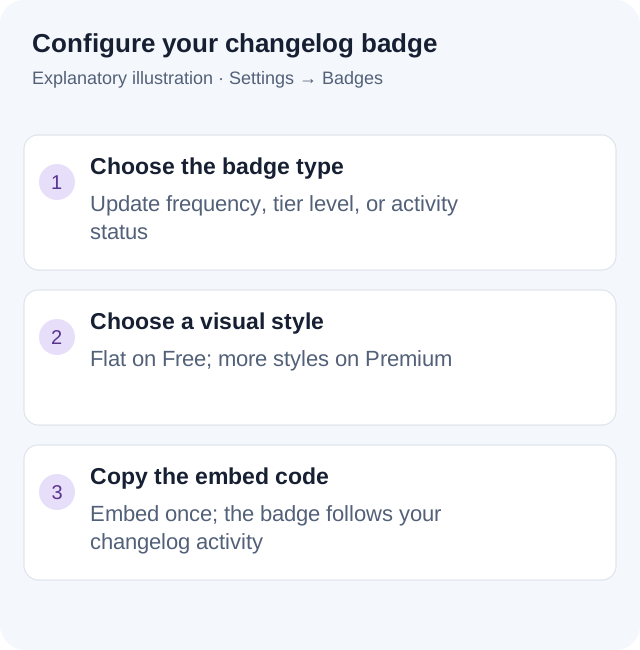
You can choose:
- Badge type (frequency, tier, or activity status)
- Visual style (light or dark)
- Placement that fits your layout
Where to Use Badges
- Homepage - Show maintenance activity without distracting from content
- README files - Give repositories instant context
- Documentation sites - Reassure users that improvements are ongoing
- Product pages - Build trust with visible update signals
Badge Types Explained
Update Frequency Badges
Best for product and marketing pages:
- “Updated Weekly” (Gold)
- “Updated Fortnightly” (Silver)
- “Updated Quarterly” (Bronze)
Tier Level Badges
Surface your maintenance consistency:
- Gold - Highly consistent updates
- Silver - Regular, reliable updates
- Bronze - Active, but less frequent
Activity Status Badges
Minimal and unobtrusive - ideal for README files. Displays “Active” or “Inactive” based on recent activity.
Styling Options
All badges support multiple styles.
Light Mode
- Flat - Clean and modern
- Plastic - Subtle depth effect
- Flat Square - Sharper, geometric look
Dark Mode
- Flat Dark - Dark background with light text
- Plastic Dark - Subtle depth for dark themes
- Flat Square Dark - Dark mode with square corners
Free vs Premium
ChangeCrab badges are fully usable on the free plan, with additional customisation available if you need it.
Free
- All badge types (frequency, tier, activity)
- Flat style
- Includes ChangeCrab attribution
Premium
- All badge types
- Additional styles, including plastic and dark modes
- Option to create custom badges
- ChangeCrab logo remains visible on badges
Get Started Today
If you’re already maintaining a changelog, you’re only one step away from making that activity visible.
Create your free ChangeCrab account →
Once set up:
- Create your changelog
- Open badge settings
- Copy the embed code
- Add it to your site
Your badge updates automatically as your changelog evolves.
Conclusion
Changelogs are valuable - but only if people see them.
ChangeCrab badges surface maintenance activity where users already are, turning your changelog into a visible, trustworthy signal. With automatic updates, fair measurement, and flexible styling, they help active projects look active.
Don’t rely on clicks to prove maintenance. Show it upfront with ChangeCrab badges.